Frequently Asked Questions (FAQs)
Does the Aosu camera require a monthly subscription?
No, Aosu camera setup does not require a monthly subscription of any kind. You don’t need any monthly plan for recording or alerts since the device has a home base and built-in storage for saving videos. However, Aosu does offer optional cloud storage plans for users who are looking for extended or off-site back ups that require a subscription.
Does the Aosu camera support 2.4GHz Wi-Fi?
Yes, a majority of Aosu cameras support 2.4GHz WiFi connection. The new models offer dual-band support meaning they can connect to both 2.4GHz and the 5GHz network bands. This offers flexibility in terms of connection to WiFi networks.
How do I set up an Aosu camera?
The Aosu camera setup process can be completed easily using the Aosu App. You can download and install the same on your wireless device and then power on the camera. You might need to charge it if needed. You can add the camera to the app using the QR code and the scanner on your app and then follow the in-app instructions to connect it to the WiFi network at your home. Once that’s done, you can install the camera at its desired location.
Why is my Aosu camera not connecting to Wi-Fi?
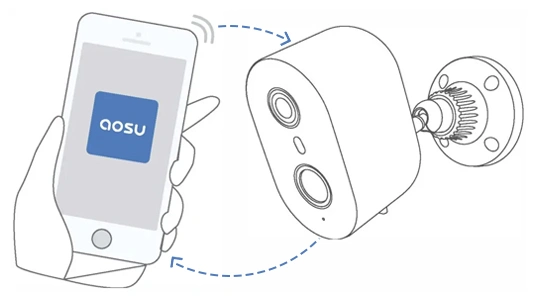
Aosu cameras may not connect to WiFi due to issues like selecting the wrong network band for connections. Check the camera model you have and see which network band it works with, and then connect it to the desired network band. Secondly, you can face issues with WiFI connections due to weak signal.
To resolve the same, you can move the camera closer to the router. The next issue may be using an incorrect password for the WiFi network, or MAC filtering enabled on your router. You can sign in to the router setup interface and check the details you need and try them to add the camera to the WiFi network. To disable the MAC Filtering, you will need to disable the same from the router settings wizard as well.
Can I use the Aosu camera without cloud storage?
Yes, you can always use the Aosu camera without buying additional cloud storage. The homebase that comes with the camera kit can be used instead, to store the video recordings locally on a SD card. You can choose to use an SD card with larger storage space, if needed. In fact, the home base itself offers up to 32GB of local storage space.
Is the Aosu camera compatible with Alexa or Google Assistant?
Yes, Aosu camera setups are compatible with virtual assistants like Alexa and Google Assistant. You can use the VAs to control your devices easily using voice commands. You can enable the camera skills from the respective VA settings and start using them to set up a smart home ecosystem.
How do I reset my Aosu camera?
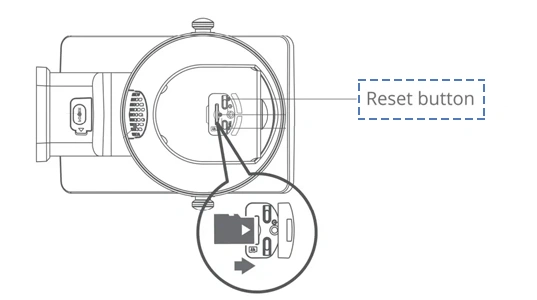
To reset your Aosu camera, locate the reset button next to the C-type cable port. Press and hold the same for about 5-10 seconds or until the LED on the camera flashes and you hear a chime sound coming out from the camera. Once that happens, you can release the button to start the process. Once the device reboots, you can reconfigure the settings.
Is the Aosu camera good for outdoor use?
For Aosu camera setups including the Aosu floodlight camera, Aosu Solarcam, and Aosu Doorbell Setup, installation is pretty easy which makes them a solid choice for outdoor applications. All of the range of cameras from Aosu feature weatherproof IP66 ratings, solar power options for continuous operation and additional features like 2K QHD videos, AI motion detection, a wide field of view and local storage. This makes them durable and even more functional in different weather conditions.
Can I watch live video remotely on my phone?
Yes, you can always view live videos from the Aosu camera on your phone using the Aosu app. The app allows you to view real-time footage, receive alerts on motion detection and other scenarios, and manage other camera settings all from one place.
Does Aosu camera work at night?
Yes, Aosu security cameras work very well during night time. These cameras offer full-color night vision with integrated spotlights and IR(Infrared) recording capabilities for clear and detailed low-light video quality.
Is Aosu camera free to use?
The Aosu camera setup itself comes free with some long-term subscription plans for cloud storage. However, if you choose to use the local storage options like an SD card on your homebase, you can call your camera free essentially.
Which Wi-Fi does Aosu camera support?
Aosu camera supports both 2.4GHz and 5GHz network bands of a WiFi network. However, some models may only work with the 2.4GHz band. Therefore, it is essential that you check the camera’s product manual to connect it to the right band.
Why is my Aosu camera offline?
Your Aosu camera may be offline due to power cable connection issues, weak WiFi signals due to signal interference or temporary glitches as well. To resolve these, you can start with checking the power connections, restarting the router if needed and moving the router closer to the camera to ensure good signal coverage. Also check if the camera is connected to the appropriate signal band of the WiFi network. Finally, you can use the Aosu camera login page to sign in to the setup interface and then update the camera firmware.